
Ships and docks
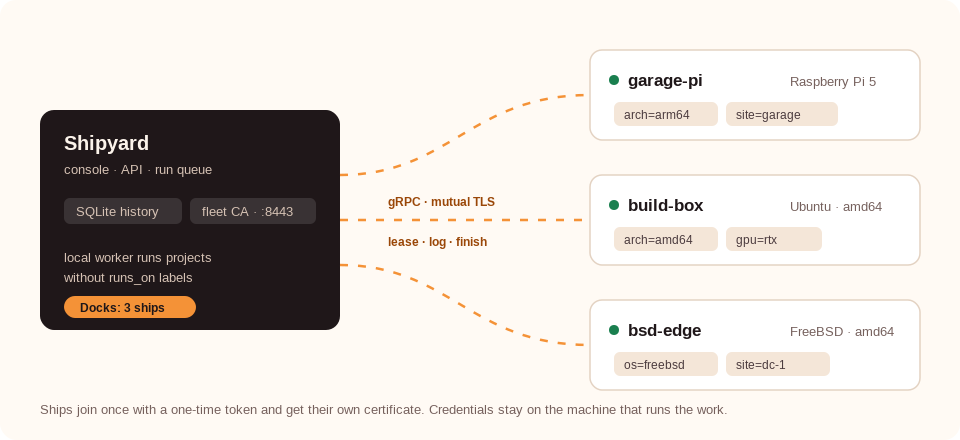
A ship is a worker on another machine — a Raspberry Pi next to the hardware it tests, a build box with more cores, a FreeBSD host. Ships connect to Shipyard, lease runs, execute them locally and send logs and results back. Docks in the console lists every ship.
How it works
- Shipyard opens a fleet endpoint (gRPC over TLS, port 8443 by default) with its own certificate authority.
- You create a one-time join token in Docks. It is valid for one hour and carries the CA fingerprint, so the ship verifies it is talking to your Shipyard.
ship joinexchanges the token for the ship's own client certificate. From then on every call uses mutual TLS.- A project with
runs_onlabels runs only on a ship that carries all of them. Projects withoutruns_onstay on the Shipyard machine. - Credentials never travel: a run tells the ship which environment variable or file holds a key, and the ship reads it locally.
1. Open the fleet endpoint
Add to Shipyard's configuration and restart:
runtime:
  api_token_env: SHIPYARD_API_TOKEN
fleet:
  listen: 0.0.0.0:8443
  address: shipyard.lan:8443          # what ships dial
  hosts: [shipyard.lan, 192.168.1.10] # names and IPs in the server certificate
Ships must reach address. Open TCP 8443 to them in your firewall. With Docker, publish 8443 next to 8080.
2. Route a project to ships
projects:
  - id: firmware
    repository: you/firmware
    enabled: true
    runs_on: [arch=arm64, site=garage]
    # …
Runs of firmware wait in the queue until a ship with both labels is free.
3. Install the ship
Download ship for the machine's platform from Downloads:
sudo install -m 0755 ship-linux-arm64 /usr/local/bin/ship
sudo useradd --system --home-dir /var/lib/ship --shell /usr/sbin/nologin ship
sudo install -d -m 0700 -o ship -g ship /var/lib/ship
Ships also run in containers — see Docker and Kubernetes below.
4. Join
In the console open Docks → Add ship, give it a name and labels, and copy the command.
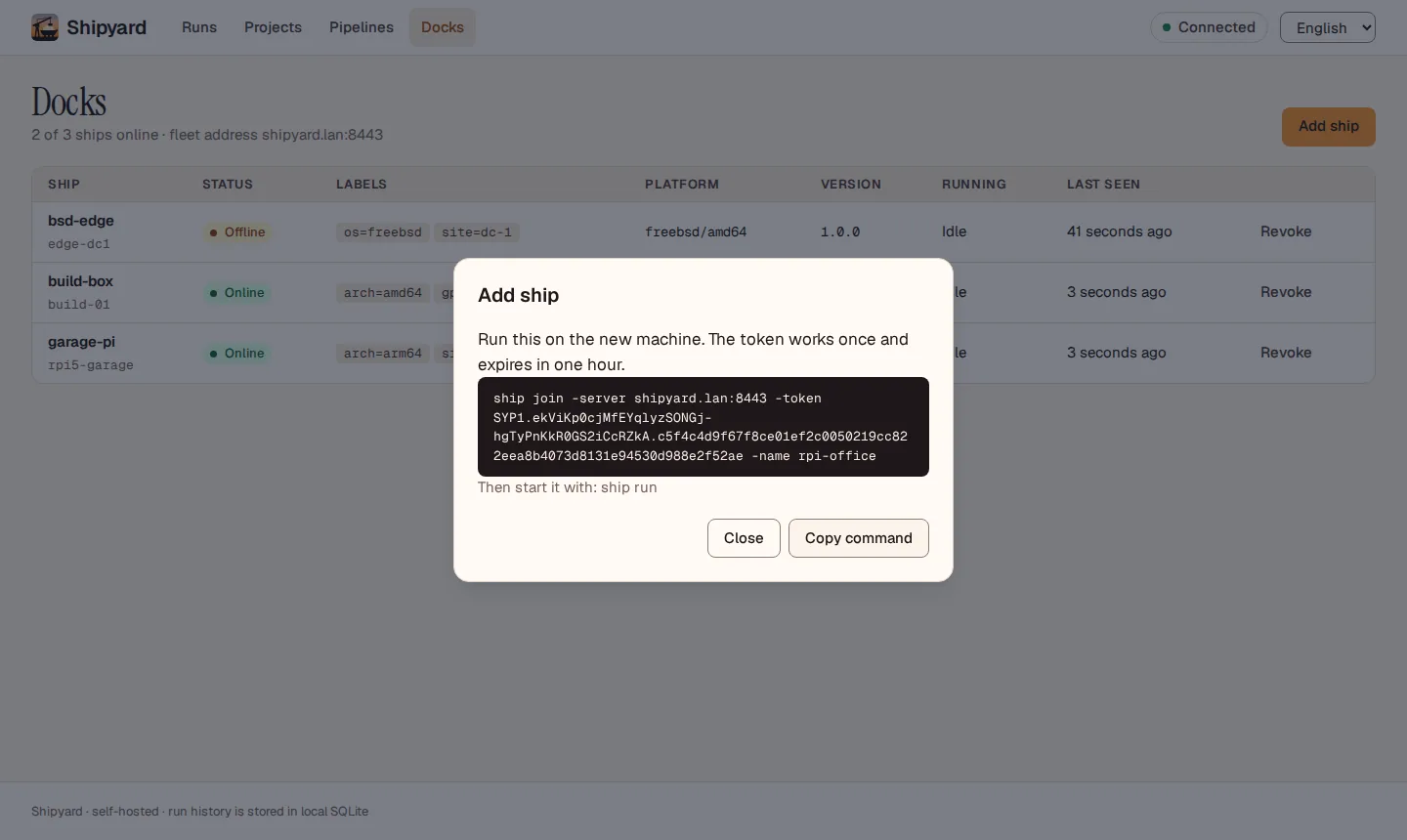 Run it on the new machine as the
ship user:
sudo -u ship ship join -server shipyard.lan:8443 -token SYP1.… -name garage-pi
The ship writes its identity, private key and certificate to /var/lib/ship. The private key never leaves the machine. A token works once by default; create a new one for every ship. For many machines at once, such as one ship per Kubernetes node, set Ships in the dialog (or uses in the API) to the number of machines: the token then enrolls up to that many ships within its lifetime, and each ship sets its own name with -name. On the Shipyard host, shipyard ship token -labels mode=node -uses 12 -ttl 2h issues the same token from the command line.
Ships behind another NAT: set fleet.relay: true next to remote.relay. The join command then ends with -relay https://lighthouse… -yard … (or set SHIP_RELAY and SHIP_YARD). The ship tries -server first and uses Lighthouse when it cannot connect, on join and on every reconnect. Nothing listens on the ship and no port opens on the Shipyard side. The ship's TLS goes through Lighthouse end to end: Lighthouse sees only encrypted bytes and cannot read or change the work. Lighthouse lets a ship in only with the ticket it got at join; a revoked ship's ticket stops working.
5. Run it as a service
/etc/systemd/system/ship.service:
[Unit]
Description=Shipyard ship
Wants=network-online.target
After=network-online.target

[Service]
User=ship
Group=ship
StateDirectory=ship
StateDirectoryMode=0700
EnvironmentFile=-/etc/ship/ship.env
ExecStart=/usr/local/bin/ship run -state /var/lib/ship
Restart=always
RestartSec=5s
UMask=0077
NoNewPrivileges=true
ProtectSystem=strict
ProtectHome=true

[Install]
WantedBy=multi-user.target
sudo systemctl daemon-reload
sudo systemctl enable --now ship
journalctl -u ship -f
Put the provider keys this ship's runs need into /etc/ship/ship.env (mode 0600), e.g. OPENAI_API_KEY=…. A local model server on the ship (Ollama, vLLM) needs no key at all.
On FreeBSD, deploy/freebsd/ship is an rc.d script (ship_enable="YES" in rc.conf, state in /var/db/ship); on macOS, deploy/launchd/ship.plist is a launchd job. Both restart the ship when it exits. Neither has been tried on a real host yet.
Self-update
With SHIP_UPDATE=on in /etc/ship/ship.env the ship takes the signed release that Shipyard offers (fleet.ship_update, see the runbook). It is off by default; any value other than on or off stops the ship at start.
- Where it works: under systemd, rc.d, launchd, or started by hand when something restarts it. With
SHIP_UPDATE=onthe ship refuses to start in a container, in Kubernetes and under Homebrew (update the image or the package there), and when theshipuser can write/usr/local/bin/shipor its directory. - What it does: while idle, it downloads the release over its Fleet connection, resuming an interrupted download, and checks the signature against the keys built into the installed binary, then the platform, size, SHA-256 and version rules. It keeps the release in
/var/lib/ship/update/, waits for its run, task and SSH sessions to end, and exits; the service manager starts it again, and the installed binary checks the release once more and runs it. - When it goes wrong: a release that fails a check is deleted and not fetched again for an hour. A new version that exits three times before its first lease is rolled back to the previous one, then to the installed binary, and never taken again. A Shipyard outage is not a failed start.
- Check:
sudo -u ship ship update status -state /var/lib/shipprints theSHIP_UPDATEsetting and the detected install kind, then the current, previous and proven versions, start count, bad versions, floor and last refusal. Docks shows each ship's version, install kind, whether self-update is on, the release offered to it and the fleet's target release, all read only; the ship reports its install kind (systemd,rcd,launchd,manual,container,kubernetes,homebrew) to Shipyard with every lease.
Docker and Kubernetes
The Shipyard image contains /ship. In a container, configure it with environment variables; ship run joins by itself on the first start and keeps its identity on a volume, so restarts don't need a new token.
| Variable | Meaning |
|---|---|
SHIP_SERVER |
Fleet address, host:8443 |
SHIP_TOKEN |
One-time join token (only used on the first start) |
SHIP_NAME |
Name in Docks; defaults to the host name |
SHIP_LABELS |
Comma-separated labels, e.g. runtime=docker,arch=arm64 |
SHIP_STATE |
State directory; /var/lib/ship in the image |
SHIP_HOST_ROOT |
Node mode: report the host whose filesystem is mounted read-only at this path, not the container (Linux) |
SHIP_CLAUDE |
Claude Code binary for agent steps |
SHIP_CHECKOUTS |
Directory for the working trees of agent steps with a ref (Checkout per run); default is the account's cache directory |
SHIP_SANDBOX |
Any value confines agent steps to their workdir (Sandbox) |
SHIP_SANDBOX_READ, SHIP_SANDBOX_WRITE |
Extra paths a sandboxed agent may read or change, separated like PATH |
SHIP_DOCKER_CONTAINERS |
Names of Docker containers whose state and logs Shipyard may read (containerStatus, containerLogs), comma-separated; names only, no IDs or patterns; empty means none. Offered only while /var/run/docker.sock answers (checked at start and again at most every 30 seconds, so a Docker daemon started later appears without restarting the ship), and not in node or cluster mode. Access to the Docker socket is root-equivalent: the ship sends only GET /_ping, inspect and logs requests for the listed names, but a compromised ship process could do anything the socket allows. The ship user needs read and write access to the socket |
SHIP_SSH_ACCOUNTS |
Local accounts people may reach through brokered SSH, comma-separated; empty means no SSH |
SHIP_SSH_AI_ACCOUNTS |
Accounts also open to AI sessions (needs infra.ssh.ai.enabled and more, see the SSH docs) |
SHIP_POLL_INTERVAL (flag -poll-interval) |
How long an idle ship waits between asking for work, in Go duration syntax (500ms, 2s). Default 2s, allowed 500ms to 10s; anything else (2h, 0, soon) stops ship run at start with an error naming the setting. A shorter wait shortens the start of a task that only this ship can take and costs the server proportionally more polls. A refused ship still backs off from this value (doubling, up to 5 minutes). The ship logs the effective value when it starts |
SHIP_SSH_PORT |
Port of the local sshd that SSH sessions reach on 127.0.0.1; default 22 |
SHIP_SSH_HOST_KEY_DIR |
Directory with sshd's ssh_host_*_key.pub files; default /etc/ssh |
SHIP_SSH_RECORD |
1 lets this ship record SSH sessions; AI sessions need it, human ones when Shipyard records them |
SHIP_SSH_RECORDER |
Path of the ship binary sshd runs for recorded sessions; default the running binary |
SHIP_SSH_RECORD_SOCKET |
Socket where the ship waits for recorders; default /run/ship/ssh-record.sock |
SHIP_SERVICE_RESTART |
systemd services, without .service, that Shipyard may restart (serviceRestart), comma- or space-separated, at most 64. Empty means none. Linux with systemd only, not in node or cluster mode; ship run exits on an invalid name or on ship, dbus, polkit or systemd-*. A polkit rule must allow the same list (Restart a service) |
Docker:
docker run -d --name ship --restart unless-stopped --read-only \
  -v ship-state:/var/lib/ship \
  -e SHIP_SERVER=shipyard.lan:8443 -e SHIP_TOKEN=SYP1.… -e SHIP_LABELS=runtime=docker \
  --entrypoint /ship shipyard:latest run
compose.yaml in the repository has the same as the ship profile: SHIP_TOKEN=SYP1.… docker compose --profile ship up -d ship.
Kubernetes: deploy/kubernetes/ship.yaml defines a StatefulSet — one ship per replica, each with its own volume and its own token in the ship-join secret (ship-0, ship-1, …), provider keys in ship-env, a non-root read-only container and /ship healthcheck as the liveness probe.
kubectl apply -f deploy/kubernetes/ship.yaml
kubectl -n shipyard logs -f statefulset/ship
One ship per node: deploy/kubernetes/ship-daemonset.yaml runs a DaemonSet in node mode. Create one token for all nodes (labels mode=node, Ships = node count), and on every node a state directory /var/lib/shipyard-ship (mode 0700, owner 65532) so a restarted pod keeps its ship. The node's filesystem is mounted read-only; the ship reports the node's hostname, uptime, load, memory and root filesystem, never runs privileged and gets no ServiceAccount token. Service status is not available in node mode. Details: node ships.
One ship per cluster: deploy/kubernetes/ship-cluster.yaml runs one ship with SHIP_KUBERNETES=in-cluster and labels mode=cluster. It lists the cluster's nodes (Ready, cordoned, kubelet version, roles, memory, disk and PID pressure) through a ServiceAccount that may only get and list nodes. Ask for it as the clusterNodes task.
kubectl apply -f deploy/kubernetes/ship-daemonset.yaml
ship healthcheck exits non-zero until the ship has joined, when its certificate has expired, and when Shipyard has revoked the ship (it then prints revoked). Agent steps need Claude Code in the container: build your own image FROM the Shipyard image with the CLI added, and mount the repositories the agent works on.
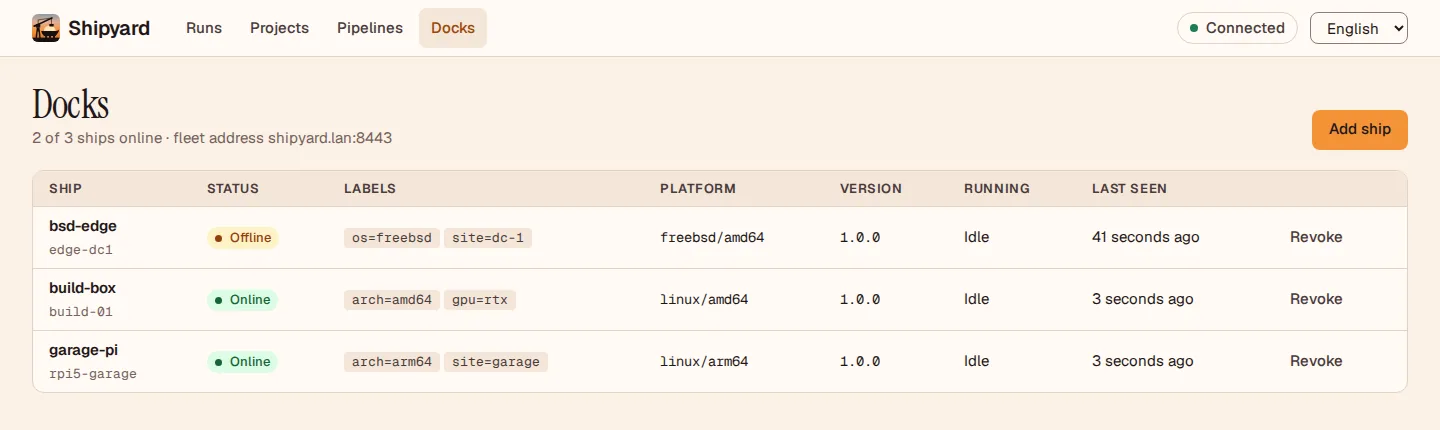
Docks
| Column | Shows |
|---|---|
| Status | Online — called in within 15 seconds. Offline — not heard from. Revoked — no longer allowed. |
| Labels | What the ship carries for routing. |
| Platform, version | Reported by the ship. |
| Running | The run it is executing now, or Idle. |
Revoke cuts a ship off immediately: its certificate stops working, and a run it was executing is recovered like any interrupted run. To bring the machine back, join it again with a new token.
On the ship, a refused lease (PermissionDenied or Unauthenticated) makes it wait longer before asking again: 2, 4, 8 seconds and so on, with jitter, up to 5 minutes. It logs the first refusal, the revocation, at most one reminder every 15 minutes, and the recovery. After at least three refusals over at least a minute it counts itself revoked and writes the file revoked in its state directory; ship healthcheck then fails, so a container's health check or a Kubernetes liveness probe shows it. A short refusal, for example while Shipyard restarts, does not count, and other errors keep the 2-second interval. The first accepted lease clears the state; a new join gives a new ship, which ignores the old file. A run in flight stops at its next heartbeat, which Shipyard refuses too.
The run panel shows Ran on — the ship, or the Shipyard machine — for every run.
Commands
ship join -server HOST:PORT -token TOKEN [-name NAME] [-label key=value]... [-state DIR]
ship run [-state DIR] [-claude PATH] [-checkouts DIR] [-sandbox] [-sandbox-read PATHS] [-sandbox-write PATHS]
ship healthcheck [-state DIR]   # exit 1, printing "revoked" when Shipyard refuses the ship
ship update status [-state DIR] # self-update state
ship version
-state defaults to /var/lib/ship. Labels given with -label are added to those in the token.